What Are LMS, LXP, LRS and Authoring Tools – and When Do You Need What?
•By AlonLearn Team
LMS, LXP, LRS and authoring tools are often mentioned together, but they serve different purposes in a modern learning ecosystem. To choose the right learning platform, it is essential to understand what each system does, how they work together – and when you actually don’t need them.
What Is an LMS (Learning Management System)?
An LMS (Learning Management System) is the core system used to manage learning activities, participants and completion. Many people automatically associate an LMS with e-learning, but an LMS is much more than that.
A modern LMS can be used to:
manage courses, seminars and conferences
run webinars and live streams
publish video, podcasts and other learning content
handle invitations, registrations and waitlists
send communication and reminders
invoice and charge for course participation
An LMS can therefore function as an advanced registration and administration system, even without e-learning. E-learning is just one possible learning format within an LMS – not a requirement.
What Is an LXP (Learning Experience Platform)?
An LXP (Learning Experience Platform) focuses on the learner experience and personalization. While an LMS is often administration-driven, an LXP is learner-centric.
An LXP typically provides:
personalized learning recommendations
content based on role, interests and skill needs
support for informal learning such as videos, articles and microlearning
better visibility into personal learning progress
In practice, the line between LMS and LXP has become increasingly blurred. Many modern platforms combine LMS structure and administration with LXP-style user experience in a single solution.
What Is an LRS (Learning Record Store)?
An LRS (Learning Record Store) is a system designed to store and analyze detailed learning data. While an LMS often tracks basic completion status, an LRS captures much richer learning activity data.
An LRS is typically used together with:
SCORM
cmi5
xAPI
An LRS records data such as:
learner progress
time spent
scores and results
pass / fail status
The Fall from the Scaffolding – Could the Employer Prove the Training?
For privacy reasons, we cannot disclose the identities involved in this case.
What began as an ordinary workday ended in a serious accident. A skilled worker fell several meters from scaffolding and was severely injured. The incident immediately became a case for the Labour Inspection Authority. The questions came quickly — and they were serious: Had the employer fulfilled their legal obligations? Had the employee completed and passed the mandatory fall protection training?
In situations like this, every minute counts. The employer was able to log into AlonLearn immediately and document that the employee had completed the required e-learning course and passed the final assessment, which included a defined minimum score requirement.
But the investigation did not stop there. Authorities raised a more specific question: Had the worker truly understood the most critical parts of the training — particularly the correct use of safety harnesses and carabiners?
Through detailed tracking in SCORM Cloud, the employer could drill down to the exact assessment questions. They were able to document that these specific questions had been answered — and answered correctly.
This is the difference between assuming and knowing. Between lacking documentation and having verifiable proof. In cases involving personal injury, the consequences can be significant — human, financial, and legal. Without precise documentation, an employer may face substantial liability.
Tracking through an LRS is therefore not just a technical feature. It is a safeguard — for employees, for management, and for the organization as a whole.
What Is an E-learning Authoring Tool?
An e-learning authoring tool is used to create the actual digital course content. This is where interactive courses are built using text, video, quizzes and assessments.
Authoring tools:
are only used to produce e-learning
export courses in standard formats such as SCORM, cmi5 or xAPI
cannot be used on their own without an LMS/LRS
If you are not producing e-learning, you do not need an authoring tool.
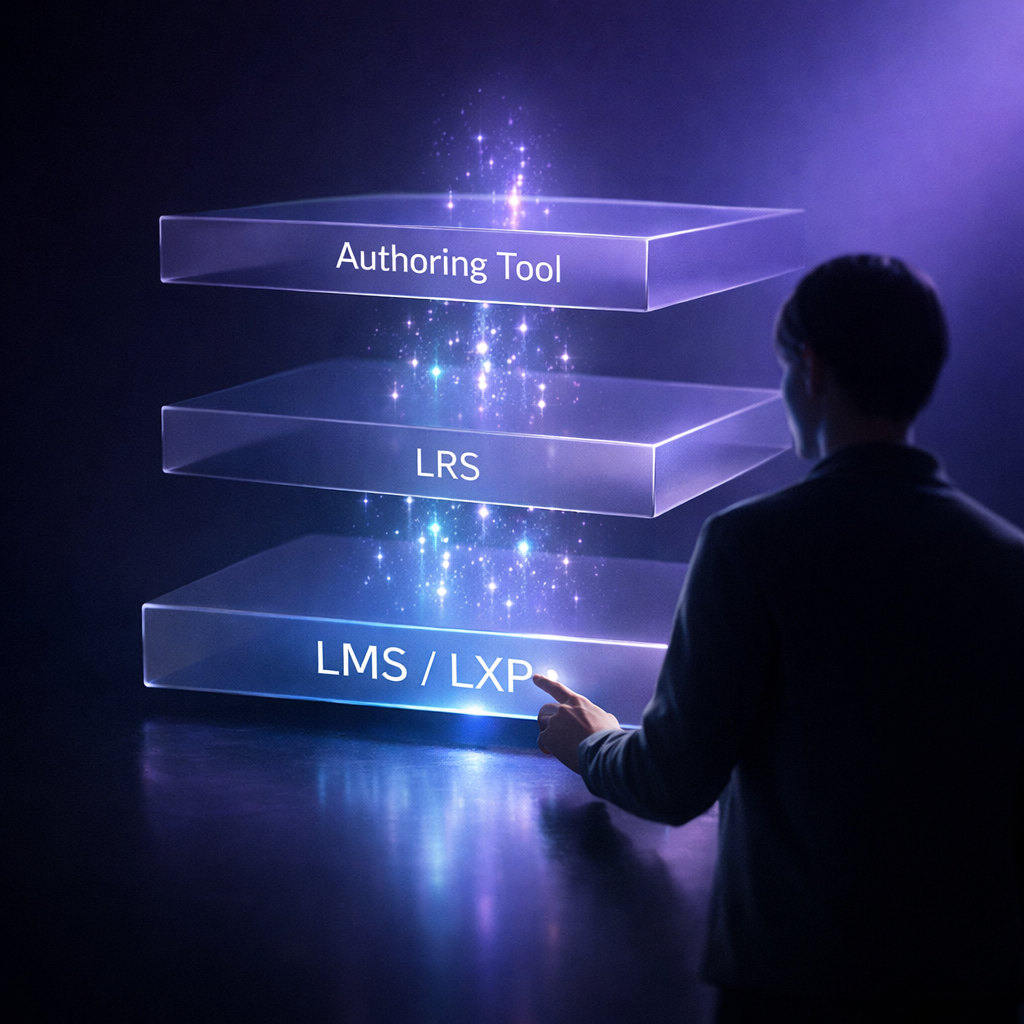
How Do LMS, LXP, LRS and Authoring Tools Work Together?
A typical e-learning workflow looks like this:
An authoring tool is used to create the e-learning course
The course is exported as SCORM, cmi5 or xAPI
The LRS handles playback and detailed learning data tracking
The LMS/LXP manages users, access, reporting and communication
For learning formats such as webinars, classroom training, videos or conferences, an LMS/LXP alone is often sufficient.
AlonLearn – LMS and LXP in One Platform
AlonLearn is both an LMS and an LXP. The platform supports a wide range of learning activities:
e-learning
webinars and live streaming
classroom training and conferences
video and podcasts
registration, participant management and invoicing
For e-learning, AlonLearn uses SCORM Cloud as its LRS.
SCORM Cloud – A Leading LRS for Standardized E-learning
SCORM Cloud is one of the world’s most trusted systems for handling standardized e-learning content and supports:
SCORM
cmi5
xAPI
SCORM Cloud is particularly strong in:
reliable playback of e-learning courses
learner interaction
resuming courses where the learner left off
tracking learning results such as:
completion status
time spent
scores
pass / fail
All learning data is automatically reported back to AlonLearn, giving course administrators a complete overview of all participants in one system.
Authoring Tools and AI – Full Flexibility Without Lock-In
AlonLearn, together with SCORM Cloud, supports all authoring tools that follow industry standards. This gives organizations full freedom to choose tools without being locked into proprietary solutions.
We recommend Coursau, a modern AI-first authoring tool that enables rapid, efficient and high-quality e-learning development. AlonLearn also delivers Coursau as part of its ecosystem.
Contact Us
Want to Learn More About AlonLearn?
Have questions about how AlonLearn can help your organization? We're here to help you find the best solution for your needs.